How to block Instagram until you pray on iPhone
Instagram first, TikTok second, and it's 7:15 before you look up. Three ways to put something between the reach and the feed.
By the Behold team · Updated
Short answer: three options on iPhone. Delete the app, which is free but you’ll reinstall it and Safari still works. Screen Time App Limits, free and built in, but the Ignore Limit button makes it a notification rather than a limit. A prayer lock: install Behold, set a Prayer Time, add Instagram to it, and the app stays locked until you’ve prayed, with no ignore button on the block screen. Setup takes about two minutes.
The reason you’re looking this up is probably specific: it’s Instagram first, TikTok second, and by the time you look up it’s 7:15 and you have twenty minutes to get out the door. You didn’t decide to do any of it.
Here are the three real options, honestly compared.
Option 1: Delete the app
Cost: free. Effort: thirty seconds. How long it holds: about four days.
Deleting removes the icon but not the reach. The reach is triggered by a gap in the day (boredom, anxiety, avoidance) and it will find something else. Usually YouTube, sometimes the news, often Safari, where Instagram works perfectly well in a browser. And eventually the App Store, at which point you’ve also learned that you can’t stay away, which costs more than it sounds like.
Worth doing if: you need a hard reset for a defined period, ideally with someone else knowing about it. Not a system.
Option 2: Screen Time App Limits
Cost: free, built into iOS. Effort: two minutes. How long it holds: two to three weeks.
Settings → Screen Time → App Limits → Social → set a daily limit.
This is genuinely worth turning on for the weekly report alone, because seeing the real number is clarifying. As a boundary it fails, and it fails for one reason: the block screen has an Ignore Limit button. One tap, same place every time, appearing at the exact moment you’re least equipped to argue.
Screen Time was designed for a parent holding the passcode. Used on yourself, you hold the passcode, and the design collapses into a screen with a button on it. Within about three weeks the button is the habit.
Worth doing if: you want awareness. Don’t expect it to hold the line.
Option 3: Make prayer the unlock
Cost: free to download. Effort: about two minutes. How long it holds: this is the one built to survive week three.
Two things separate it from the options above.
There’s no ignore button on the block screen. Nothing to tap past. Your habit can’t learn a button that doesn’t exist.
Something fills the gap. This is the part every other approach misses. If you successfully block Instagram and nothing replaces it, you’ve made a vacuum, and vacuums refill. If prayer is what opens the app, the vacuum is filled before you even get through the door, and the reach that’s been costing you your mornings starts producing a minute with God instead.
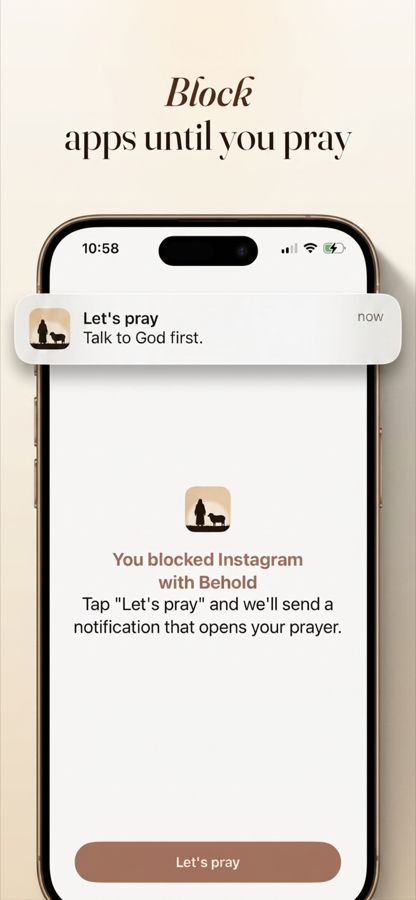
Set it up: install Behold, add one Prayer Time covering your morning window, and add Instagram to it. At 6:40 you reach for the app, get a block screen, pray for about sixty seconds with guided prompts, and it opens.
The setup, step by step
1. Install Behold from the App Store and grant Screen Time permission. This is Apple’s own framework, and the permission is what lets any app block another app on iPhone, and it’s the same one every serious blocker uses.
2. Add one Prayer Time. Cover the window when you’d realistically be sitting up. Waking at 6:30? Try 6:35–7:15. Generous windows get kept; tight ones get missed and then abandoned.
3. Add Instagram to it. Add TikTok too if that’s the second stop, which it usually is. Two or three apps is a good first list. Leave Messages, Phone and Maps alone: locking a utility manufactures an emergency, and an emergency is a permanent excuse to switch everything off.
4. That’s it. Boundaries (daily per-app limits) and Practices (protected windows for work, dinner, Sunday) can wait until week two.
What happens at 6:40
You reach for the phone. Your thumb lands on Instagram. Instead of the feed: a block screen, with no snooze, no “5 more minutes”, no passcode field.
You tap through and get P.R.A.Y., four short prompts:
- Praise. One true thing about God.
- Repent. One thing, named plainly.
- Ask. For today, specifically.
- Yield. Hand the day over.
A minute, sometimes less. Then Instagram opens and your phone is your phone again, but the day started somewhere other than the feed.
Around day four, most people notice the turn: you start praying before reaching for the phone, to get ahead of the block. That’s the habit taking over, and it’s the moment this stops being an imposition.
The honest part about bypasses
Behold is built on Apple’s Screen Time framework, because that’s the only way to block an app on iPhone. Which means: anyone holding your unlocked phone can go into Settings and switch off any Screen Time app, including this one. No iOS app can prevent that, and any app claiming otherwise is overselling, so treat the rest of its claims accordingly.
What’s actually removed is the ignore button. That’s the thing that broke your old Screen Time limits, and it matters more than it sounds, because the habit lives in the one-tap zone. It does not survive a deliberate trip through Settings menus while you’re standing there knowing exactly what you’re doing.
If you want the wall higher: have your spouse or a friend set your iPhone’s Screen Time passcode and not tell you. Then getting past Behold means asking a person, which is exactly the friction a private failure never has.
What about Android?
Behold is iPhone only right now (iOS 17.4 or later), because it’s built directly on Apple’s Screen Time framework.
A note on Instagram specifically
Instagram is usually the first stop rather than the whole problem. If you block only Instagram, watch what happens on day three. For most people the reach simply relocates to TikTok, X, or YouTube within about a week.
So lock the first two or three at once. Not nine. That’s the all-or-nothing energy that ends these experiments by Thursday. Just enough that the reflex doesn’t have an obvious next door to try.
Tomorrow morning
One Prayer Time. Instagram, and whatever comes second. Sixty seconds of prayer standing between the reach and the feed.
You’re going to reach for the phone either way. The only question is what’s waiting.
Try it tomorrow morning
Set one Prayer Time. Pick one app. That is the whole setup, and it takes about two minutes.