The Christian app blocker that makes prayer the unlock
There are a dozen of these now and most are the same app. Here's the one question that tells you which will still be on your phone in a month.
By the Behold team · Updated
Short answer: a Christian app blocker is worth installing only if the thing standing between you and the app is something you have to do, not something you can dismiss. Most blockers put up a screen with a button on it. You learn the button in three days and then you are back where you started. Look for one where the unlock is an action (in Behold’s case, praying) and where there is no ignore button on the block screen.
If you are searching for this, you have probably already tried Screen Time. You set a 30-minute limit on Instagram, felt good about it for a week, and now you tap Ignore Limit so fast you don’t remember doing it. That is not a character flaw. That is what happens when you put a button in front of a habit.
Why most Christian app blockers stop working
There are more of these apps than there used to be, and if you download five of them you will notice something: they are largely the same app with different verses on the lock screen. They all use Apple’s Screen Time framework. They all show you a blocking screen. And nearly all of them give you a way past it in one tap: a snooze, a “5 more minutes”, a grace button, a passcode you set yourself and remember perfectly.
The pattern is always the same:
- Week one. The block screen is startling. It works. You feel different.
- Week two. You find the bypass. You use it “just this once”.
- Week three. The bypass is the habit. The block screen is a speed bump you don’t see anymore.
- Week four. You delete the app, and you feel worse than before you installed it, because now you’ve failed at the fix too.
The mechanism failed, not you. A blocker that can be dismissed is a reminder, and you already had reminders. You didn’t need to be reminded that you’re on your phone too much. You knew.
The one question to ask
Before you install anything, ask this:
When the block screen appears, what do I have to do to make it go away?
If the answer is tap something, the app will not last. Tapping is free, and anything free gets spent.
If the answer is do something that takes real attention, and especially if that something is worth doing on its own, the block has a chance. The block stops being an obstacle and starts being a door.
What a Christian app blocker should actually do
Here is a short checklist. Hold any app you’re considering against it.
- No ignore button on the block screen. Not hidden, not delayed, not “are you sure?”. Just not there.
- The unlock is the point. If you have to pray to get past the block, then every time your phone tells you no, you get a minute with God out of it. Even the “failures” are wins.
- It knows what to do when you don’t know what to say. Most people who want to pray more freeze when they actually sit down to it. A blocker that says “now pray” and leaves you staring at a blank screen has handed you a new way to feel guilty.
- It fits a real day. You have work. You have a commute. You have a small group on Wednesdays. A tool that blocks your phone during a meeting is a tool you will uninstall.
- It is honest about its limits. Any app that tells you it is impossible to get around is lying to you, and you should not trust the rest of its claims either. (More on this below.)
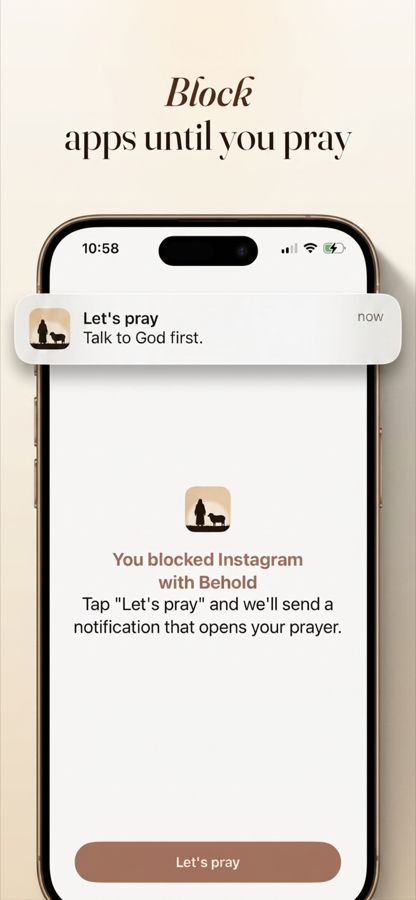
Behold in one line: you set your Prayer Times, you choose which apps go quiet, and when one of those times arrives the apps you picked stay locked until you’ve prayed. Usually about sixty seconds. There is no ignore button on the block screen.
How Behold works, concretely
1. You set your Prayer Times. Most people start with one: the morning, because that’s the one that hurts. Add midday and evening later if you want them. This is the same instinct behind Daniel praying three times a day: prayer that is scheduled is prayer that survives a busy week.
2. You choose which apps lock. Pick the ones your thumb goes to without asking permission. For most people that’s Instagram, TikTok, X, YouTube, Reddit. Leave your phone, your messages, your maps, your calendar alone. They are not the problem, and blocking them just makes you resent the app.
3. The Prayer Time arrives. You reach for Instagram out of reflex, and instead of the feed you get a block screen. No ignore. No snooze.
4. You pray. Behold walks you through P.R.A.Y.: Praise, Repent, Ask, Yield. Four short prompts. You are not being asked to produce a twenty-minute devotional at 6:40am; you are being asked for a minute of actual attention. If you have no words, the prompts give you words to borrow.
5. The apps unlock. You get your phone back. But you got it back on the other side of prayer, which means the day started with God instead of with the feed.
Over a week, the Prayer Ring shows you the shape of your day: which Prayer Times you kept, which you drifted past. Not a streak to protect at all costs. A picture of what’s actually happening.
Being honest about bypasses
Behold is built on Apple’s Screen Time framework, which is the same foundation every serious blocker on iPhone uses. That framework has a hard limit: anyone holding your unlocked iPhone can go into Settings and turn off any Screen Time app, including this one. No iOS app can prevent that.
So no, this is not a vault. What it is, is a wall between you and the reflex. The reflex is the thing that actually runs your mornings: the reach you make before you’re awake enough to decide anything. Beating that reflex requires about eight seconds of friction and one deliberate decision. Digging through Settings takes longer than praying does.
If you want a harder wall, set a Screen Time passcode you don’t know, and have your spouse or a friend set it, so turning Behold off requires asking a person. That is not a Behold feature; it is an iPhone one, and it works.
Choosing between the options
Here is how the categories actually compare.
Plain Screen Time (free, built in). Good for awareness. Fails as a boundary because of the Ignore Limit button. Worth turning on regardless, for the weekly report.
A general-purpose blocker. Stronger locks, some with real friction. But nothing replaces the scroll, so you just get a locked phone and a vague resolve. The vacuum fills back up.
A Christian app blocker with prayer as the unlock. The block produces something. That is the whole difference. You are not just being kept out of Instagram; you are being let into a habit you already wanted.
Start with one app and one Prayer Time
Do not lock nine apps and set five Prayer Times on your first day. That is how people quit by Thursday. Pick the single app you open first in the morning, and set one Prayer Time for the ten minutes after you usually wake up. Live with it for a week. Then add.
Setup takes about two minutes and Behold is free to download.
Try it tomorrow morning
Set one Prayer Time. Pick one app. That is the whole setup, and it takes about two minutes.