 God first. Pray first. Scroll later.
Your phone stays locked
until you’ve
prayed.
Behold is a prayer habit app for iPhone. Set your Prayer Times, and when one arrives the apps that pull you away, like Instagram and TikTok, lock until you pray. About sixty seconds. No ignore button. Grace, not guilt.
Free to download · iPhone · iOS 17.4 or later · No ads, ever
What Behold looks like
Four screens do the whole job: the block, the prayer, the rhythm, and the day you actually prayed.
-
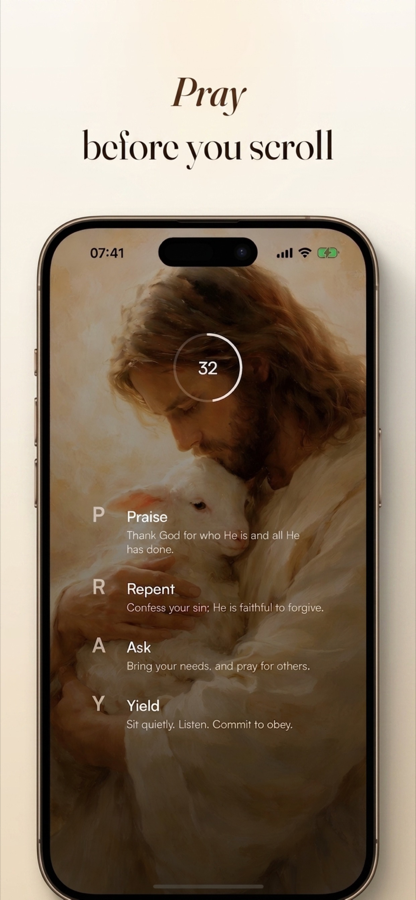
Pray before you scroll The unlock screen. A countdown runs while you pray, and the P.R.A.Y. steps sit underneath as a guide, not a checklist you have to finish. -
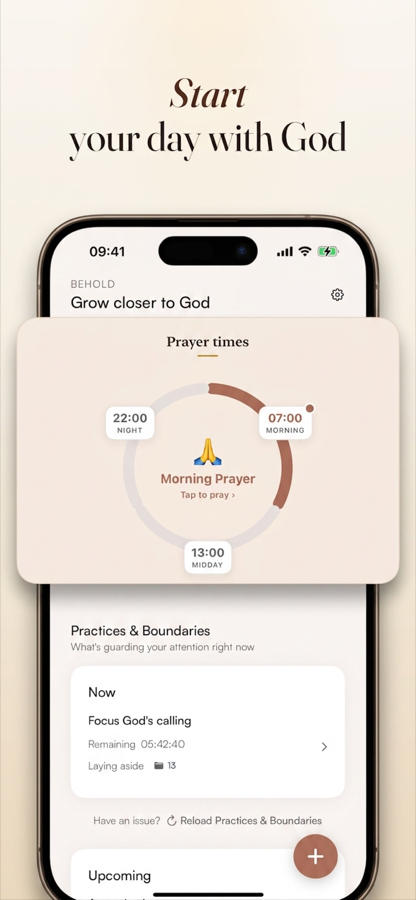
Start your day with God Your Prayer Times, laid around the day as a ring. Morning, midday, night: you pick the moments that fit your real life. -
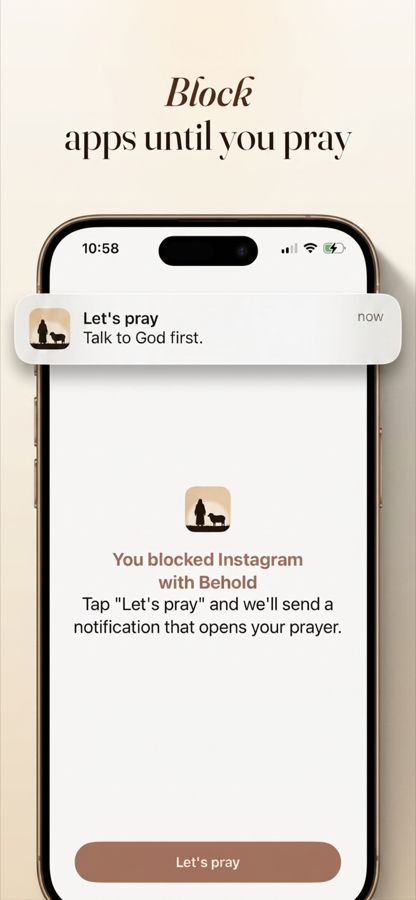
Block apps until you pray What you see when you reach for Instagram at a Prayer Time. No ignore button, no timer to wait out. The only way through is to pray. -
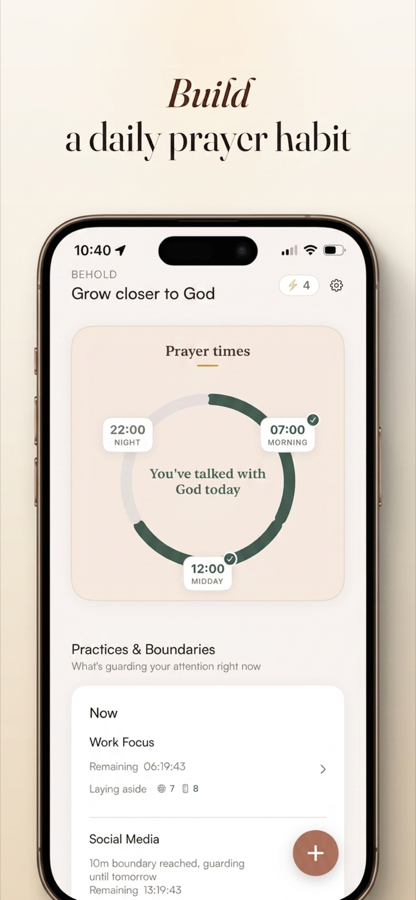
Build a daily prayer habit The ring fills in as you pray. Miss one and it simply stays open and waiting, never red, never counted as a failure.
Swipe to see more →
How Behold works
You have set limits before. You tapped past them. Here is what is different, in four steps.
-
Choose your Prayer Times
Pick the moments you actually want to meet God: 7:00 in the morning, midday, last thing at night. You are not committing to a rule someone else wrote. You are setting your own rhythm.
-
Choose the apps that pull you away
Instagram, TikTok, the news, the games. Behold uses Apple's Screen Time to shield only the apps you select. Calls, messages and maps stay open unless you say otherwise.
-
Your apps lock when the time comes
Reach for Instagram at your Prayer Time and you get a quiet screen instead of a feed. There is no ignore button on it. That is the whole point: the choice is taken out of the reflex moment, when you are weakest.
-
Pray, say Amen, and go
About sixty seconds. The P.R.A.Y. steps are there if you want them (Praise, Repent, Ask, Yield), and silence counts just as much. Say Amen and your apps open. Your Prayer Ring fills in a little more.
Why this works when Screen Time didn’t
Every fix you have tried had a way out built into it, and it opened at the exact moment you were weakest. Apple’s App Limits put Ignore Limit right there on the screen. A deleted app is thirty seconds from reinstalled. A fast breaks by reflex before you remember you were fasting.
Behold’s screen has no ignore button. The Amen button does not even appear until sixty seconds have passed with Behold open. There is nothing to tap. Your reflex has nowhere to go except into the prayer, which was the point all along.
To be straight with you: iOS lets anyone disable any Screen Time app from Settings, and Behold is no exception. But that is a deliberate walk through several menus, not the two-second reflex tap that has been beating you. And it is the reason Behold can never hold your phone hostage.
Prayer Times
Set the moments you want to meet God: morning, midday, evening. When one arrives, the apps you chose lock until you pray.
Pray to unlock
No skip. No dismiss. No timer to wait out. A short prayer guided by the P.R.A.Y. steps, ended with “Amen”. That is the only way through.
Prayer Ring
Your whole day at a glance: what is happening now, what is coming, what is done. Miss one and it stays open and waiting. Never red.
Boundaries & Practices
Daily limits on the apps that take the most, plus protected windows for work, church or dinner. Both open the same way: you pray.
Download Behold
Free on the App Store. Let your next Prayer Time be the one that starts the habit.
iPhone · Requires iOS 17.4 or later · English · No Android version yet. We’d rather say so than waste your time
No ads. Ever.
Nothing between you and prayer. Not on the free tier, not anywhere.
Honest billing
The price is shown before anything starts, and cancelling is one tap in your Apple subscription settings.
It can't trap your phone
Behold shields only the apps you pick. Calls, messages and maps stay open. iOS Settings is always the fail-safe.
A real person answers
Support emails go to Ralph, who builds it. Not a ticket queue.
Guides
Practical, honest answers to the things people actually search for, and how to use Behold to do each one. No filler.
- Choosing a tool
The Christian app blocker that makes prayer the unlock
There are a dozen of these now and most are the same app. Here's the one question that tells you which will still be on your phone in a month.
Read the guide → - Choosing a tool
How to block apps until you pray
The full setup: choosing your Prayer Times, picking which apps lock, and what actually happens when you reach for your phone.
Read the guide → - The mechanism
Why your Screen Time limits stopped working
The Ignore Limit button is why years of Screen Time limits changed nothing. The fix isn't trying harder.
Read the guide → - The mechanism
How to block social media as a Christian without white-knuckling it
Social media fasts break by reflex, not by decision. A different approach: make prayer the door you have to walk through.
Read the guide → - The morning
How to stop scrolling in the morning and pray first
The 6:40am problem: you reach for your phone before you've said a word to God. Here's how to change the reach itself.
Read the guide → - The diagnosis
Is my phone an idol? A Christian look at phone addiction
"It's become an idol. In my hand, my heart, my head." On the difference between conviction and shame, and which one changes anything.
Read the guide → - Prayer habit
How to build a daily prayer habit that actually sticks
Daniel prayed three times a day, on a schedule, with the windows open. Structure isn't the enemy of a real prayer life. It's how it survives.
Read the guide → - Prayer habit
The P.R.A.Y. method: what to say when you don't know how to pray
For when you sit down to pray and your mind goes blank. Four steps, sixty seconds, no experience required.
Read the guide → - The mechanism
How to block Instagram until you pray on iPhone
Instagram first, TikTok second, and it's 7:15 before you look up. Three ways to put something between the reach and the feed.
Read the guide →
Frequently asked questions
Including the ones we would rather you asked before you download than after.
What is Behold?
Behold is a prayer habit app for iPhone. You set Prayer Times through your day, and when one arrives, the distracting apps you chose, like Instagram and TikTok, lock until you pray. A prayer takes about sixty seconds and ends when you tap Amen. It is not a screen time tracker with a Bible verse attached; the prayer is the whole point, and the blocking is what makes it happen.
Learn more: How Behold works → How does an app blocker that makes you pray actually work?
Behold uses Apple's Screen Time framework to shield the apps you select. When a Prayer Time starts, opening one of those apps shows a Behold screen instead of the feed. There is no ignore button and no countdown to wait out. You pray for about sixty seconds, guided by the P.R.A.Y. steps if you want them, tap Amen, and your apps open again.
Learn more: Read the full guide → Can I bypass Behold or turn it off?
Honestly: yes, and you should know that before you download. iOS lets anyone disable any Screen Time app from Settings, and Behold is no exception. But that is a deliberate, multi-step walk through Settings, not the two-second reflex tap that has been beating you for years. Behold is built to win the reflex moment. That same Settings switch is also the fail-safe that means Behold can never hold your phone hostage.
Learn more: Why Screen Time limits stop working → Is Behold different from Screen Time limits I already have?
Yes, in one specific way. Apple's own App Limits put an Ignore Limit button on the screen, and most people tap it without thinking within a week. Behold's screen has no such button. The only way forward is a prayer with a sixty-second floor, and the Amen button does not even appear until that time has passed with Behold open. It removes the choice at the exact moment you are least able to make it.
Learn more: Screen Time limits that don't work → Isn't forcing prayer legalistic?
It would be if Behold graded your prayer, but nothing about it is scored. The P.R.A.Y. steps (Praise, Repent, Ask, Yield) are a suggestion, not a gate. Nothing tracks whether you worked through them. If you sit in silence for the sixty seconds, you have prayed. Scheduled prayer also has deep precedent: Daniel prayed three times a day on a schedule, the Psalmist kept evening, morning and noon, and the apostles kept the hour of prayer.
Learn more: Building a daily prayer habit → What is the P.R.A.Y. method?
P.R.A.Y. is a four-part shape for prayer: Praise: thank God for who He is and what He has done. Repent: confess honestly. Ask: bring your own needs and pray for others. Yield: sit quietly, listen, and commit to obey. In Behold it appears on screen while you pray, so you are never staring at a blank page wondering what to say.
Learn more: The P.R.A.Y. method explained → What happens if I miss a Prayer Time?
Nothing bad. A missed Prayer Time is never marked red, never called a failure, and never counted against a streak. It simply stays open and waiting, and you can still pray it. Behold runs on grace, not guilt. If an app makes you feel worse about your walk with God, it is doing the opposite of its job.
Learn more: How the habit actually sticks → Which apps can Behold block?
Any app, website or category you choose through Apple's picker: Instagram, TikTok, X, YouTube, Reddit, games, news, shopping. Behold shields only what you select. It cannot lock your whole phone, and it does not touch calls, messages or maps unless you specifically choose them.
Learn more: Blocking Instagram until you pray → Does Behold see my screen time data?
No. App selection happens inside Apple's own secure picker, which hands Behold opaque tokens rather than a list of what you use. Behold does not collect or transmit your browsing history or app usage. Your Prayer Times, Boundaries and Practices are yours.
Learn more: Read our privacy policy → Is Behold free?
Behold is free to download from the App Store, and Behold Plus unlocks the full prayer habit system. The price is shown before anything starts, cancelling takes one tap in your Apple subscription settings, and there are no ads anywhere in the app, least of all between you and prayer.
Learn more: Questions about your account → Is there an Android version of Behold?
Not yet. Behold is iPhone only and needs iOS 17.4 or later, because it is built on Apple's Screen Time framework. We would rather tell you that plainly than have you download something that cannot work on your phone.
Learn more: Get in touch → Who makes Behold?
Behold is built by Ralph Hermeling, a solo bootstrapped developer, alongside a day job. He and his wife built it for themselves first, after years of ignored Screen Time limits, deleted and reinstalled apps, and broken fasts. Support emails are answered by him personally, not a ticket queue.
Learn more: Contact support →Tomorrow morning is going to happen either way.
You will reach for your phone at some point in the next twelve hours. That part is not in question. The only question is what is waiting when you do.
God first. Pray first. Scroll later.